Basic Troubleshooting in the On-Premises IoTSuite (2.0) environment
Now, suppose that your IoTSuite environment becomes inaccessible.
How can you do a preliminary investigation?

You will have two parts to check:
the infra level and the application level.
Infra Level
Server Connectivity Test
Use the Ping command to confirm whether the target host’s connection and system response are normal.
ping <host_ip_address>
or
curl http://<host_ip_address>:<host_port>
If no response or return error → check the network configuration (Ethernet / NAT / Bridged / DHCP).
TCP Port Listening (Firewall check)
Try SSH login if needed.
ssh @<server_ip>
Check listening ports on Linux
sudo ss -tulnp
or
sudo netstat -tulnp
Expected result:
LISTEN 0 4096 0.0.0.0:
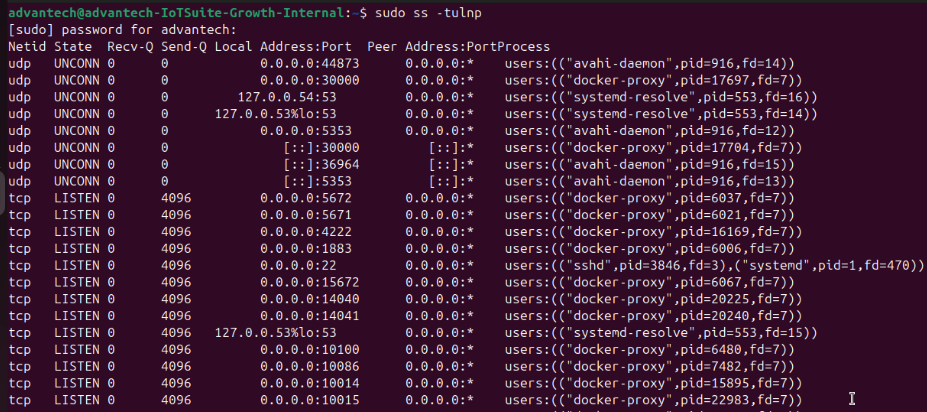
If the host environment has firewall rules set up, you need to add the corresponding port.
sudo ufw status
sudo ufw allow <host_port>/tcp
TCP Port Listening (From Windows Client)
Check connectivity with PowerShell (Test-NetConnection)
Test-NetConnection -ComputerName <ip_address> -Port
Expected result:
TcpTestSucceeded : True

Application Level
If there is no problem with the hardware connection, then the next step is to confirm whether there is a problem with the service itself.
The Linux version of IoTSuite 2.0 is built on a Docker environment.
Let’s continue to dig.
Docker Health
Check Docker Services Status
sudo systemctl status docker
Expected result:
Active: active (running)

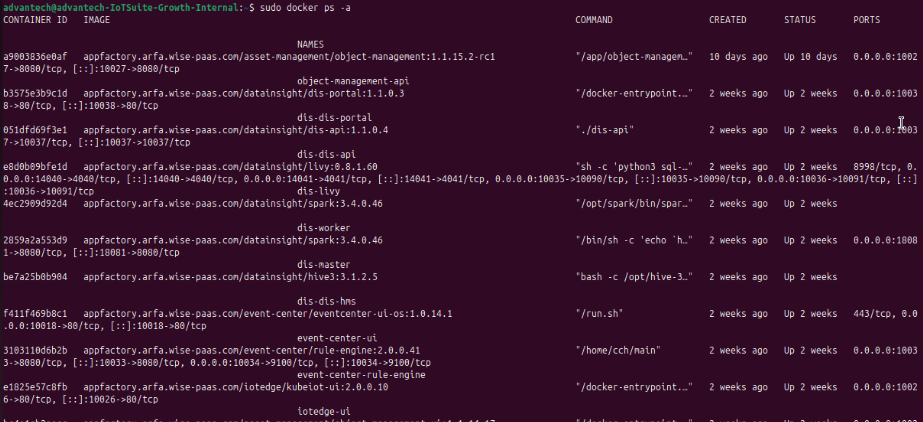
Check Containers Status
sudo docker ps -a
Expected result:
STATUS: Up
Common Problems & Fixes
-
Port already in use → Another process is occupying it → re-map port.
-
Bound only to 127.0.0.1 → Update app/container to listen on
0.0.0.0. -
Connection refused → Service inside container not listening.
-
Timeout → Firewall or cloud security group blocking port.
-
OOMKilled → Out of memory → check
docker inspectordmesg.
If any of the above troubleshooting results are abnormal, you can collect screenshots and fill out the online form to request assistance from Advantech’s FAE/SE.
Hope this knowledge helps you, and see you next time.
Sincerely,
Austin Ciou